01
Native CKB Support
Built specifically for the Nervos CKB blockchain. Send, receive and manage CKBytes with full support for short and full addresses (ckb… / ckt…).
Neuron is a free, open-source desktop wallet built for the Nervos CKB blockchain. Securely hold CKBytes, deposit into the Nervos DAO to earn secondary issuance, and manage sUDT, xUDT and Spore DOBs — all on your own device.
The open-source desktop wallet for CKB, Nervos DAO and CKB-native digital assets.
Neuron Wallet is the reference desktop wallet for Nervos CKB — the Layer 1 Proof-of-Work blockchain powered by the Cell model and the RISC-V based CKB-VM. It was created to give CKB holders a clean, first-party way to manage their assets without relying on custodians or exchanges.
Everything runs locally: your seed is generated on your device, encrypted with a password you choose, and used to sign transactions offline. Neuron talks to the CKB network through a public node or your own ckb + ckb-indexer instance — no analytics, no tracking, no account.
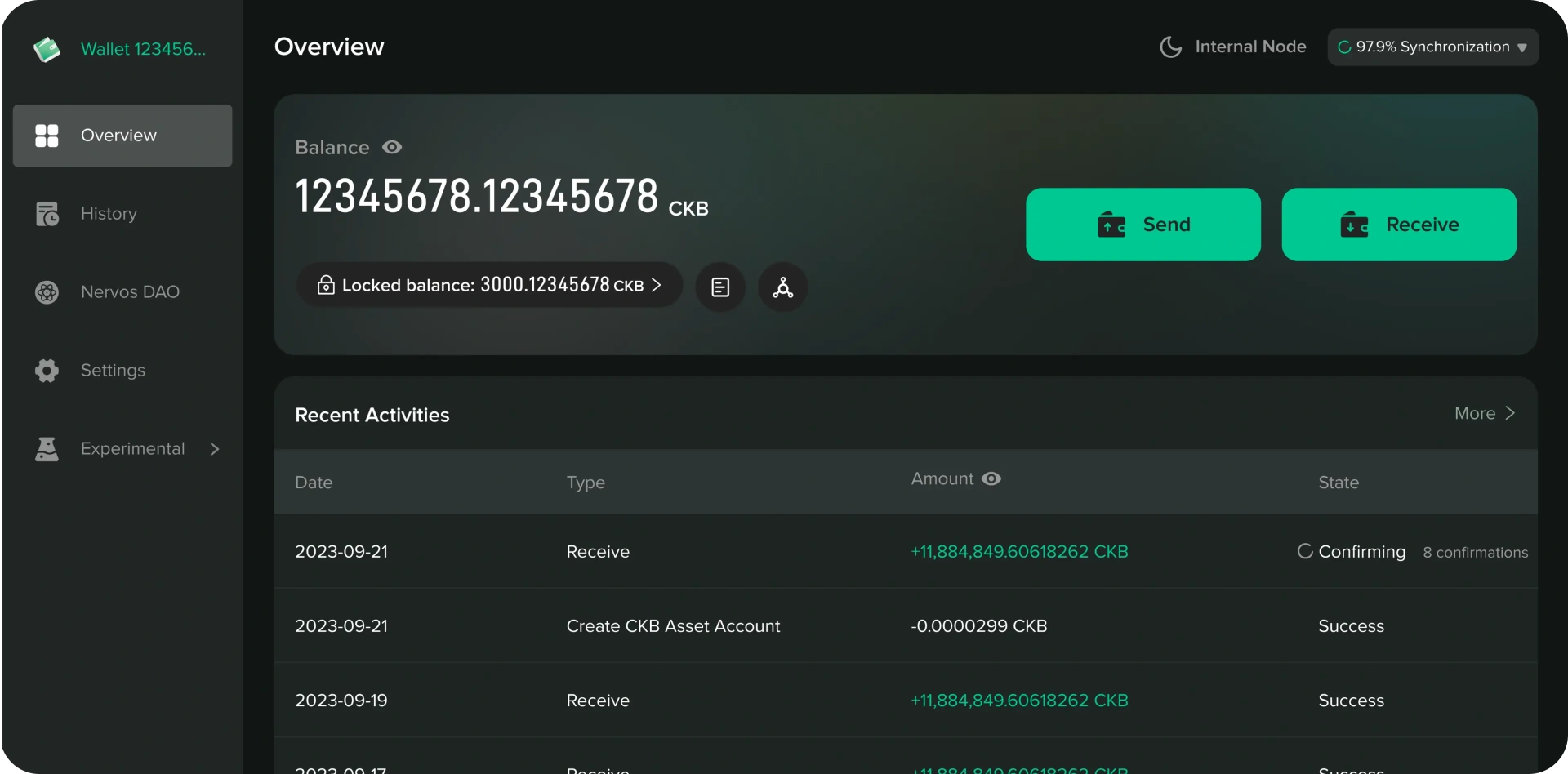
Built specifically for the Nervos CKB blockchain. Send, receive and manage CKBytes with full support for short and full addresses (ckb… / ckt…).
Deposit CKB into the Nervos DAO in one click to earn secondary issuance rewards and hedge inflation. Track deposits, compensation and withdrawal windows in real time.
Manage user-defined tokens issued on CKB. Add sUDT / xUDT assets, view balances and transfer them alongside native CKB.
View and transfer Spore Digital Objects (DOBs) and NFTs stored directly on-chain in CKB cells — true on-chain assets, not just pointers.
Pair with a Ledger device to keep your CKB private keys offline. Sign every transaction on the hardware, confirm on screen.
Advanced users can craft and manage custom lock scripts, multi-sig setups and type scripts — the full power of CKB's Cell model.
Neuron Wallet is built directly on the Nervos CKB Layer 1. It speaks the Cell model, runs the CKB-VM, and exposes every CKB-native primitive — from DAO deposits to Spore DOBs — without custodial intermediaries.
CKB stores state in Cells — a UTXO-like model where every cell carries capacity, data and scripts. Neuron lets you inspect, compose and spend cells natively.
A RISC-V virtual machine executes lock and type scripts on chain. Neuron prepares transactions, estimates cycles and validates scripts before broadcasting.
Deposit CKB into the DAO to earn secondary-issuance compensation. Neuron tracks epochs, accrued rewards and the 180-epoch withdrawal windows.
BIP-39 seeds, password-protected keystores, AES encryption and optional Ledger signing — your keys never leave your device.
Quick answers about installing, securing and using Neuron Wallet with Nervos CKB and the Nervos DAO.
Neuron is a free, open-source desktop wallet built for the Nervos CKB blockchain. It is aimed at anyone who wants to hold CKBytes in self-custody, deposit into the Nervos DAO, and manage CKB-native assets such as sUDT, xUDT tokens and Spore Digital Objects — without relying on an exchange or a custodial service.
Yes. Neuron runs entirely on your own computer. Your seed phrase and private keys are generated locally and stored encrypted on your device with a password you choose — they are never uploaded to any server. There is no account, no KYC and no tracking. The full source code is public, so anyone can audit it.
Download the build for your operating system from the download page: a .exe installer for Windows, a .dmg package for macOS (Intel and Apple Silicon) and an .AppImage for Linux. Always download from neuron-wallet.org or the official GitHub releases, then compare the SHA-256 checksum before installing.
Open the Nervos DAO tab, choose an amount and deposit your CKBytes. A deposit earns a share of the secondary issuance, which offsets inflation. Withdrawing happens in two steps: you first request a withdrawal, then unlock the funds at the end of the current 180-epoch cycle.
Native CKB, sUDT and xUDT user-defined tokens, and Spore DOBs / on-chain NFTs. Unknown tokens can be added manually from the Customized Assets screen using their type script hash, and claimed or transferred like any other asset.
Yes. Neuron works with Ledger Nano S, Nano S Plus and Nano X through the Nervos CKB app installed from Ledger Live. Private keys never leave the device: Neuron builds the transaction and you review and approve it on the Ledger screen.
Install Neuron on the new machine, choose "Import Wallet" and enter your 12-word recovery phrase, or import an encrypted keystore file exported from the old installation. Set a new local password afterwards. Your balance and history are rebuilt from the blockchain.